
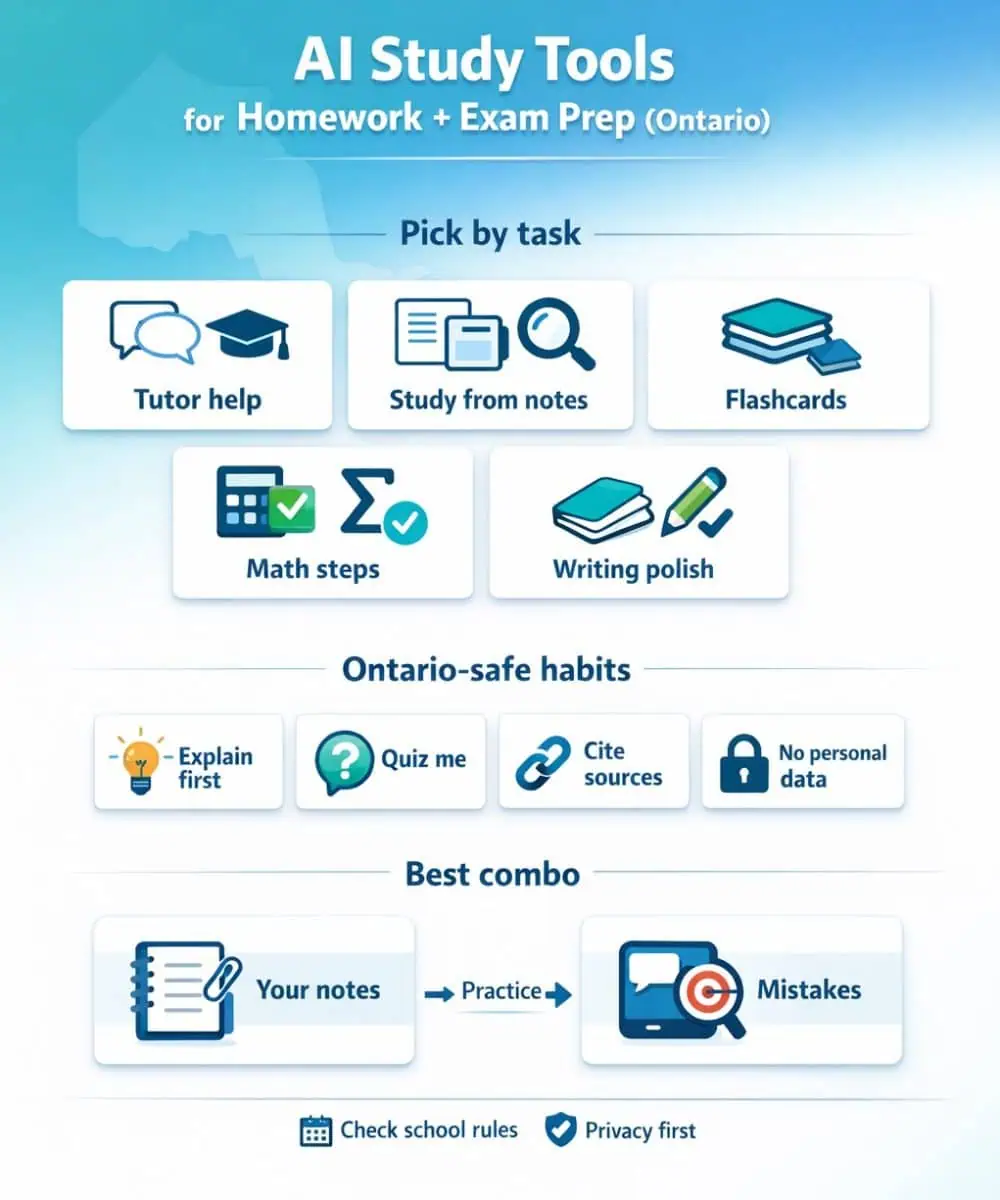
AI can be a solid study buddy in Ontario—especially for practice questions, explanations, and organizing notes. The biggest mistake is using it like an answer machine. The best tools for students behave more like a tutor: they explain, quiz you back, and help you learn from mistakes. For broader student software beyond AI, use the student software guide.
Quick picks: Best AI Study Tools for Homework
- Best all-around tutor for step-by-step learning: ChatGPT Study Mode
- Best “study from your own notes/handouts” tool: Google NotebookLM
- Best flashcards + practice tests from notes: Quizlet (Magic Notes / Study Guides)
- Best math checker (fast): Photomath
- Best math + science engine (deep, reliable): Wolfram|Alpha (Pro for Students)
- Best writing clarity + grammar: Grammarly
- Best research starter with citations you can open: Perplexity
- Best “all-in-one notes + AI help” workspace: Notion AI
- Best if your school already uses Microsoft 365: Microsoft Copilot Chat (Education)
Since many AI tools run best on mobile, it’s worth finding a cheaper student phone plan so you’re not stressing about data during exam season.
The Ontario reality check (policy + privacy)
Ontario rules vary by teacher/board, but the same themes show up in public guidance:
- Academic honesty: you’re still responsible for the work you submit.
- Transparency: some teachers want AI use acknowledged (especially for writing).
- Privacy: don’t upload personal student info or sensitive documents.
Real Ontario examples you can cite in your post:
- Halton District School Board (HDSB) has public staff/student GenAI guidelines emphasizing ethical use, integrity, and privacy considerations.
- Toronto Catholic District School Board (TCDSB) posts ethical AI guidelines for using GenAI in education.
- ECNO (educational computing org in Ontario) publishes broad GenAI guidelines for Ontario education stakeholders.
- Information and Privacy Commissioner of Ontario (IPC) has public materials on GenAI and privacy.
Practical student rule: Use AI for practice + explanations + planning, and keep graded submissions within your teacher’s rules. Device rules also affect classroom use: our report on Ontario’s proposed school-wide cellphone ban explains the proposal and its scope.
If AI tools keep distracting you, use them alongside habits that help you focus better while you study (especially during exam week).
Tools that work well in Ontario (what they’re best at)
Tutor-style learning (explanations that feel like a teacher)
ChatGPT Study Mode
Best when you tell it: “Don’t give the answer first—teach me step-by-step, then quiz me.” Study Mode was launched as a learning experience designed to guide students through problems instead of spitting out a final answer.
Microsoft Copilot Chat (Education)
If your board/school uses Microsoft 365, Copilot Chat can be the easiest “already-approved ecosystem” option. It’s positioned as secure AI chat for education accounts, and Microsoft documents how it’s grounded in web data and designed for managed environments.
Study from your own class materials (Ontario-friendly exam prep)
Google NotebookLM
This is the one that feels most “school-safe” when used properly: you upload your notes/handouts and ask questions about your sources. Google also documents how NotebookLM works with work/school accounts and that availability depends on the school’s license/admin settings.
Flashcards + practice tests from notes
Quizlet (Magic Notes / Study Guides)
Strong for memorization-heavy courses (bio terms, history, vocab, definitions). You paste notes → it generates study materials → you drill.
Math/science step checks (use as a “coach,” not a copier)
Photomath
Great for seeing steps and checking where your work went off-track. The safest habit is: check a question → close the app → redo it from scratch.
Wolfram|Alpha (Pro for Students)
Better when you need reliable computation, graphs, conversions, and structured steps (especially senior math/science).
Writing and editing (make your writing clearer, not “different”)
Grammarly
Best for grammar, clarity, and tone. Use it late in the process—after your ideas are already yours.
Research without getting lost
Perplexity
Useful because it provides citations you can click to verify. That makes it better for school research than “trust me” summaries—especially when teachers want sources.
Notes + tasks + AI in one place
Notion AI
If you already use Notion for school organization, AI helps summarize, extract key points, and rewrite sections (like turning messy notes into clean study bullets).
Lecture/meeting notes (only with permission)
Otter.ai
Good transcription + summary features, but recording rules matter. In class, always get permission and follow school policy.
If you want to get better at research, spreadsheets, and presentations, these free digital skills courses for students pair well with AI study tools.
A simple Ontario study routine
If you want one workflow that works for most courses:
- NotebookLM (20 min): upload your unit notes → generate a 1-page study guide + 15 practice questions
- Do questions (25 min): mark what you missed
- Tutor tool (20 min): use Study Mode or Copilot Chat to explain only your mistakes and quiz you back
- Quizlet (15 min): flashcards for the stuff you keep forgetting
- Math check (10 min): Photomath/Wolfram for 2–3 tricky problem types
You’re using AI to create practice + feedback fast, while your time still goes into actual learning.
Paid AI tools can add up, so it helps to plan your monthly school budget before you subscribe to anything.
