
The most common “student discount” mistake on GO is simple: you did apply… but your PRESTO never got the student setting. Then you tap on a Monday morning, see the adult fare, and assume GO “doesn’t do student discounts anymore.”
It still does — you just have to connect three things: your student status, your GO Student ID, and the PRESTO card you actually tap with.
If you’re also sorting out Youth vs Post-Secondary on PRESTO, start with our PRESTO fare types guide.
What the GO Transit post-secondary discount really means
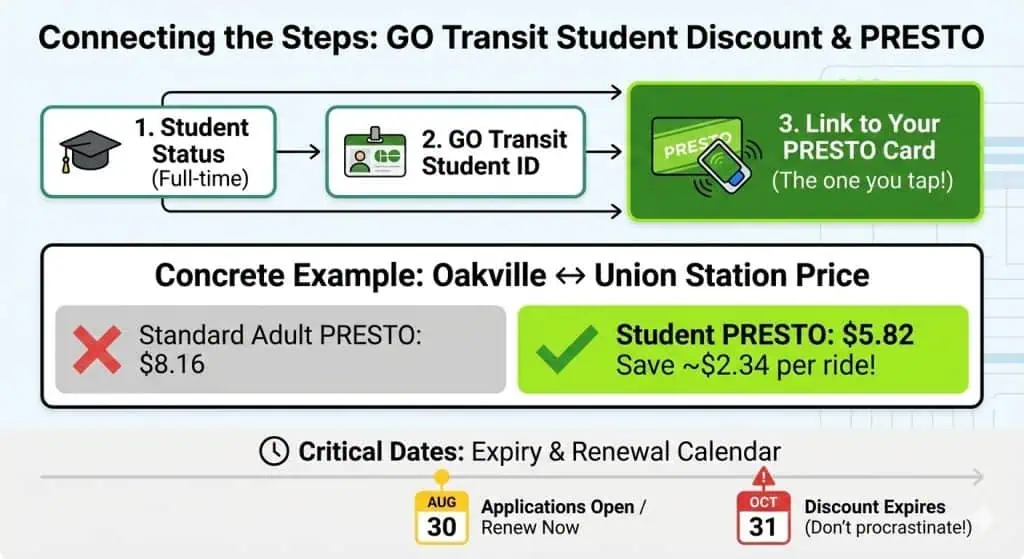
GO describes the student discount like this: 40% off the standard fare (single adult ticket) — and because adult PRESTO is already discounted, that works out to just under ~29% off the PRESTO fare on many trips. The student transit discount overview explains how GO savings fit with other Ontario transit systems.
That “40% vs ~29%” wording is the source of a lot of confusion, so here’s a concrete example GO publishes:
- Oakville ↔ Union Station: $8.16 adult PRESTO vs $5.82 student PRESTO
- That’s $2.34 saved each ride. If you do a simple two-taps-a-day commute 20 school days/month, that’s 40 rides × $2.34 = $93.60.
Read: TTC Post-Secondary Photo ID + PRESTO setup
Who can use it (quick reality check)
This specific discount is for full-time post-secondary students who can get a GO Transit Student ID and then load the post-secondary setting onto PRESTO.
If you’re part-time, GO’s own FAQ is clear: this fare type is only available for full-time students (but you can still use regular PRESTO savings).
If you’re balancing classes and shifts, this guide on working while studying in Ontario can help you plan realistically.
The part that actually matters: how it gets “loaded” onto PRESTO
Think of it like a switch on your PRESTO profile. You’re trying to flip it to “Post-Secondary” for GO/UP.
There are two common setups, and which one you use depends on whether you ride UP Express too:
If you travel on GO (and not UP Express)
You’ll typically redeem a PRESTO voucher code that arrives in the email after you’re approved.
If you travel on GO and UP Express
PRESTO’s guidance says to set it up at Shoppers Drug Mart using your GO ID.
That’s why two students can follow “the same steps” and get different results — they’re not actually on the same path.
International student? These part-time job tips can help you estimate how often you’ll commute.
Do it in one sitting (so you don’t lose the email / code)
Here’s the clean flow most people succeed with:
1) Request the GO Transit Student ID
Use GO’s Student ID request portal and apply with a personal email you check.
2) Watch for the approval email
That email is important because it’s where people usually get the voucher/next instructions (and you may need the GO Student ID handy when travelling).
3) Connect it to the PRESTO you actually tap with
- GO-only riders: redeem the voucher (then re-check your PRESTO fare type later the same day).
- GO + UP riders: do the in-person setup at Shoppers with your GO ID.
Read: PRESTO Student Discounts in the GTA + Hamilton
How to tell it worked (before you burn a week of adult fares)
In the PRESTO app / account, look at your card details and confirm the fare type shows the post-secondary setting for GO.
If you want to be extra-safe, do one “test tap” on a short ride when you’re not rushing to class — then check your trip history fare.
The date that catches everyone: expiry and renewal

PRESTO states the post-secondary fare type expires every year on October 31.
They also say you can apply for the next year starting August 30.
If you remember nothing else: late August = renew, late October = don’t procrastinate.
When something goes sideways
- “I redeemed the voucher in the PRESTO app and it’s not working.”
GO’s FAQ says a replacement voucher is one-time use, and you may need to visit a Customer Service Outlet or GO Transit Ticket Counter to have the fare type reset. - “I tapped with my credit card once and got charged adult fare.”
That’s expected. The student discount is tied to PRESTO, not contactless credit/debit taps. (Use PRESTO if you want the student fare.) - “My friend has the discount but I don’t.”
Most often: different setup (GO-only vs GO+UP) or the fare type never got applied to the correct PRESTO card.
A quick “do I have it?” cheat sheet
If this is true, you’re usually good:
- You’re a full-time post-secondary student
- You have a GO Student ID
- Your PRESTO shows the post-secondary fare type and you tap with PRESTO
If you’re choosing where to keep student money, compare options here: best student bank accounts in Ontario.
FAQ
Do I need a GO Student ID even if I already have a student card from school?
Yes — PRESTO lists the GO Transit Student ID as required for the post-secondary fare type.
Why does GO say 40% off but my savings look smaller?
Because the 40% is off the standard single adult ticket. GO notes that becomes just under ~29% off the PRESTO fare in practice.
When does it expire?
PRESTO states it expires annually on October 31 (and next-year applications start August 30).
